What if you could have the readable Python APIs you love, but the raw performance of a systems language under the hood?
That question led me to build a Python web framework written in Rust. The goal wasn’t to build the next production ready framework (that already exists, it’s called Robyn). The goal was to learn and experiment using Python and Rust together, and to benchmark the results against pure Rust, Go, FastAPI, and Flask.
This is a blog companion to the YouTube video for those who prefer reading over watching. Code available on GitHub.
The Real Heroes: PyO3 + Maturin
The bridge between Python and Rust is built on two tools:
PyO3: a Rust library that creates the interop layer between the two languages. It handles type conversions, manages Python’s GIL, and exposes Rust code to Python via the C API.
Maturin: the build tool that compiles PyO3 Rust code into C FFI libraries and packages them as Python wheels.
PyO3 handles the what (the interop), and Maturin handles the how (the build and packaging).
One practical note: when installing Maturin, I’d recommend installing it from source rather than via Homebrew as the Homebrew version can conflict with a Rustup installation. See: PyO3/maturin/pull/2605
Step 1: Hello World (Calling Rust from Python)
The first step is simply getting Python to call a Rust function.
The Rust side is a library crate using PyO3. Here’s a minimal example, a function that adds two numbers and returns the result as a string (this basically what comes the out of the box with a Maturin scaffolded project):
use pyo3::prelude::*;

#[pyfunction]
fn add(a: i32, b: i32) -> String {
    (a + b).to_string()
}

#[pymodule]
fn pyper(_py: Python, m: &PyModule) -> PyResult<()> {
    m.add_function(wrap_pyfunction!(add, m)?)?;
    Ok(())
}
The Python side adds the compiled Rust library as a local dependency (via uv add --editable ../rs), then calls it like any other module:
import pyper

result = pyper.add(1, 2)
print(f"1 + 2 is {result}")
Running this outputs: 1 + 2 is 3. 🐍 🪄 🦀
Step 2: Async (Two Loops, One App)
For CPU heavy calculations, that hello world example pretty much covers it. However, a web framework needs async to handle concurrent connections efficiently. This is where things get interesting and a little complex.
Here’s the rub: we actually need two event loops. One in Rust (tokio), one in Python (uvloop). These need to work together without blocking each other or fighting over the GIL.
This is where pyo3-async-runtimes (which is the successor to pyo3-asyncio) comes in to help make this not a complete disaster . Also, per the pyo3-async-runtimes readme #non-standard-python-event-loops, we’ll be using Python 3.14+. Why uvloop and not the standard asycnio Python event loop? Well if we’re already going to suffer writing a Python framework in Rust, might as well suffer a little bit more to get the most of it.
On the Python side, uvloop.run(main()) kicks it off and then on the Rust side, #[tokio::main] spins up the Tokio runtime. When Python’s main awaits the Rust exposed async function, the two runtimes hand off control neatly.
import uvloop
import pyper

async def main():
    await pyper.start_server()

uvloop.run(main())
Step 3: HTTP with Hyper
The HTTP layer is built on Hyper, a lower level Rust HTTP library (as opposed to a higher level framework like Axum) to gives us maximum flexibility to wire up the Python integration without fighting framework conventions.
The Rust server binds to a TCP socket, listens for incoming connections using a Tokio event loop and spawns a task per connection. A router function matches incoming requests by method and path, dispatching to handlers that return Response<Bytes>.
At this stage, all the route handlers still live on the Rust side, which is pretty useless for a Python framework, but hang in there.
Step 4: Where’s the Snake?
Okay, now we’re finally getting to something that looks like an actual framework. Rather than hardcoding routes in Rust, we exposes an add_route function to Python. The Python code then defines routes using decorators, just like Flask or FastAPI:
from pyper_bindings import PyperServer

app = PyperServer()

@app.get("/")
async def index(request):
    print(request)
    return "Hello from Pyper!"

@app.post("/submit")
async def submit(request):
    return "Submitted!"

await app.start("127.0.0.1", 3000)
Under the hood, each decorator invokes server.add_route(method, path, handler) on the Rust side, storing a mapping from (HTTP method, path) to a Python function (callable).
When a request arrives, Rust looks up the correct Python handler, builds a PyperRequest object (containing the method, path, headers, and body), passes it across the FFI boundary, awaits the Python response (coroutine), gets back a string response body, and wraps that into a full HTTP response.
The PyperRequest struct just carries request data from Rust to Python:
#[pyclass]
struct PyperRequest {
    method: String,
    path: String,
    headers: HashMap<String, String>,
    body: String,
}
A note on the Python locals capture (wtf is that): when the server starts, it captures Python’s task local context. This is required so that later, when Rust calls back into Python to invoke a handler, it has the correct execution context. pyo3_async_runtimes/#the-solution
Step 5: Static Files
Serving CSS, images, and other static assets requires a small addition on the Rust side. We’ll use a StaticFilesConfig struct that holds the URL prefix (e.g. /static) and the filesystem directory to serve from.
The request handler checks whether the incoming path starts with the static prefix before routing to Python. If it does, Rust reads the file directly from disk using tokio::fs::read and returns the bytes.
Path sanitization is handled in Rust by canonicalizing the path and verifying it still falls within the configured static directory.
From the Python side, configuring static files is one line:
app = PyperServer(static_dir="./static", static_prefix="/static")
Step 6: Templates with Handlebars
For server side rendering, we’ll uses the Handlebars Rust crate. Why Handlerbars and not something like Askama? Well Askama uses strict type checking, and I figured the flexibility of Handlebars (we’re getting runtime data from Python) was better.
Templates are registered once at startup (not on every request) and rendered in Rust using data passed from Python as a dict. The template engine is exposed through the bindings as a TemplateEngine class. A helper on the Python bindings side handles registration accepting either a file path or an inline template string, hashing it to generate a stable ID, and registering it with the Rust side Handlebars registry.
A simple index template:
<!DOCTYPE html>
<html>
  <head>
    <link
      rel="stylesheet"
      href="https://unpkg.com/@picocss/pico@1/css/pico.min.css"
    />
  </head>
  <body>

  </body>
</html>
And the Python handler that renders it:
@app.get("/", template="templates/index.html")
async def index(request):
    return {"body": "Hello, world!"}
Recap: The Full Request/Response Flow
Putting it all together, here’s what happens from startup to serving a request:
Startup:
- Python spins up the uvloop event loop
- Python registers routes and templates by calling into Rust via PyO3
- Python awaits
app.start(), which crosses into Rust and starts Tokio - Rust binds to the TCP socket and captures Python’s task locals
At runtime (per request):
- Rust receives the incoming TCP connection
- The request handler checks: is this a static file path?
- If yes: Rust reads the file and returns the bytes directly
- If no: look up the matching Python handler in the router
- Rust builds a
PyperRequestand calls the Python handler - Python’s handler runs, optionally rendering a template, and returns a string body
- Rust wraps the string body into an HTTP response and sends it to the client
Python stays clean and simple. Rust handles the all the hard stuff. Neither side needs to know much about the other and you’ve successfully smuggled Rust into a Python project. Praise 🦀.
Benchmarks: Does It Actually Work?
Let’s find out if all that effort was even worth it. I should mention that benchmarks, especially the simple ones for this project, never really tell the full story. However, I do think these benchmarks are useful as a rough gauge.
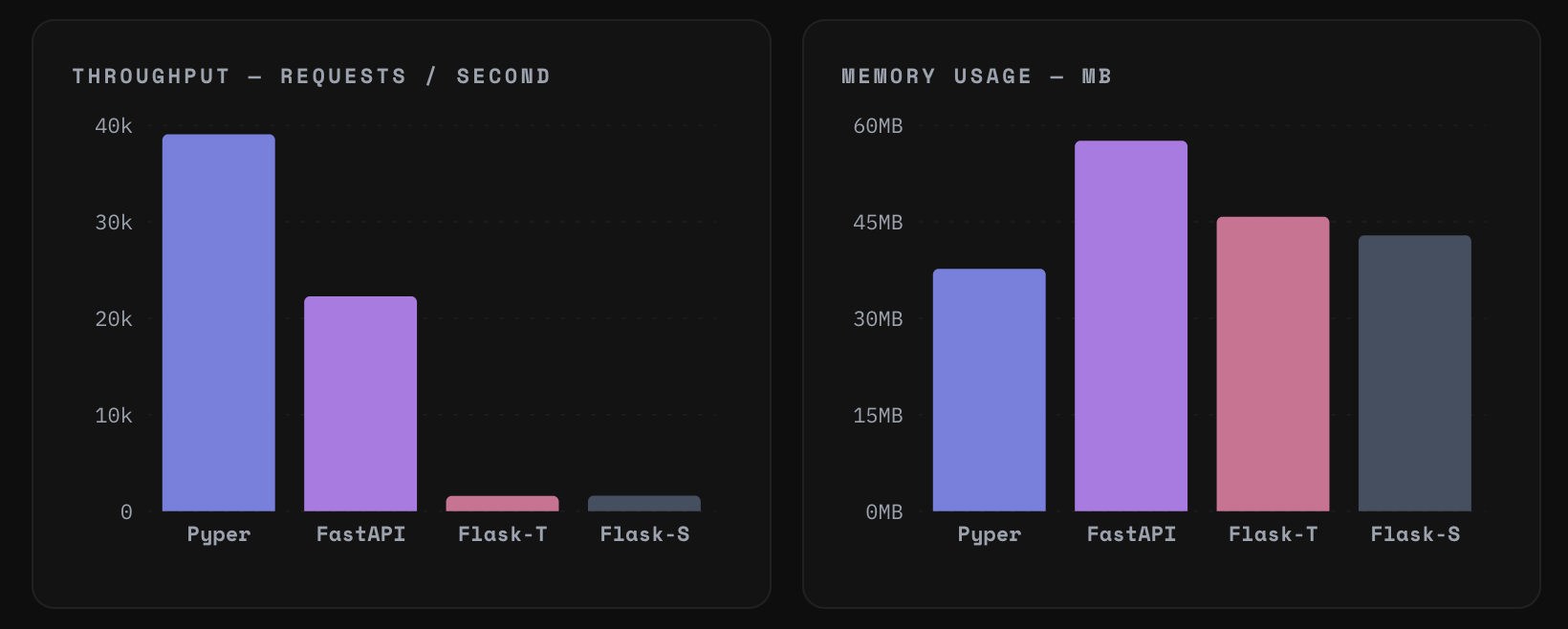
You love to see it. We smashed the throughput and slashed the memory usage. Okay, that’s all Folks!
Huh? What about Go and pure Rust?
Well…
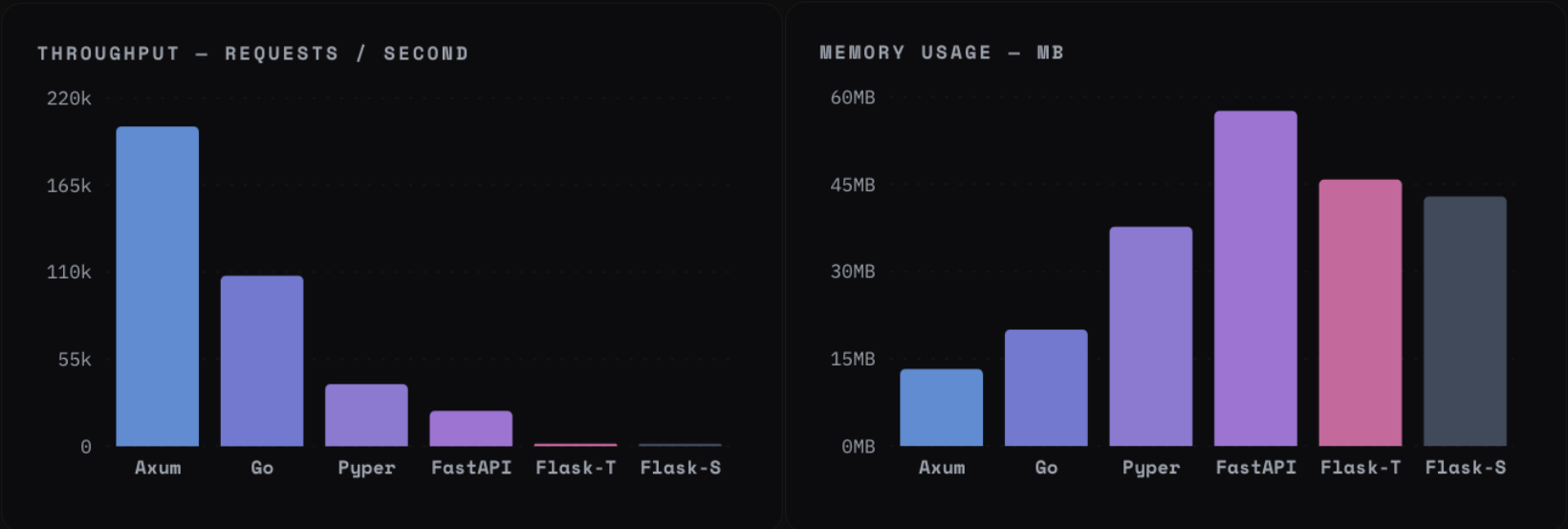
Pesky y axis scaling strikes again…
So we benchmarked against Axum (pure Rust), Go (net/http), FastAPI, and Flask using wrk with 1,000 concurrent connections over 10 seconds. Two scenarios were tested: an I/O bound test with an artificial delay (simulating database / API calls) and a CPU bound test with no delay (raw throughput).
Thread counts were normalized: each framework was given 5 OS threads where possible (4 Tokio workers + 1 main thread for Rust, GOMAXPROCS=2 for Go which gave 5 total, FastAPI defaults to 5). Flask was tested in both single threaded and multi threaded modes.
I/O Bound Results
| Framework | Requests/sec | Peak Memory | Threads |
|---|---|---|---|
| Axum | ~2,400 | 10 MB | 5 |
| Pyper (hybrid) | ~2,475 | 20 MB | 5 |
| Go | ~2,400 | 55 MB | 5 |
| FastAPI | ~223 | 39 MB | 5 |
| Flask (threaded) | ~221 | 62 MB | 248 |
| Flask (single) | ~1 req/s | 40 MB | 1 |
For the I/O results: Rust, Go, and the Pyper hybrid are essentially identical within 1% of each other. Even FastAPI is only about 3% slower.
The lesson here is that for I/O bound workloads, architecture (async vs. sync) matters far more than language choice.
CPU Bound Results
| Framework | Requests/sec | Peak Memory | Threads |
|---|---|---|---|
| Axum | ~203,000 | 13 MB | 5 |
| Go | ~104,000 | 20 MB | 5 |
| Pyper (hybrid) | ~38,000–39,000 | 40 MB | 5 |
| FastAPI | ~21,300 | 58 MB | 5 |
| Flask (threaded) | ~1,600 | 44 MB | 32 |
Here the picture is different. Pure Rust is around 5x faster than the hybrid. But the hybrid is still ~75% faster than FastAPI (not bad, eh?).
I imagine we’re constrained by the overhead of crossing the Rust / Python boundary on every request, plus the obligatory blame the Python GIL.
The Efficiency Angle
The most underrated column in the benchmark is memory. With 1 GB of RAM:
- You can run ~17 FastAPI instances
- You can run ~27 Pyper hybrid instances
- You can run ~99 Axum instances
At scale, this translates directly to infrastructure cost. A system handling 1,000 requests /sec with FastAPI might need 3x the servers compared to the same system on a Rust / Python hybrid and 6x compared to pure Rust.
Verdict: is Rust + Python Worth It?
For I/O bound workloads (most web applications), the answer is: it doesn’t really matter much. Async Python with FastAPI or any proper async framework gets you nearly all of the performance of pure Rust, with far less complexity.
For CPU bound workloads, the hybrid is compelling. You’re 75% faster than FastAPI and using significantly less memory, while still writing Python flavored app code.
The real trade off is engineering complexity. You’re maintaining a codebase with two languages with different runtimes, managing FFI boundaries, and navigating dual event loops. That’s not free. But for teams that need Python’s ecosystem and developer ergonomics and need to squeeze performance out of hot paths, it’s a real option.
Remember: the proper version of this idea is Robyn and it’s worth checking out if this pattern interests you. This experiment was just a proof of concept that shows you how it works starting from the basics.
Okay, that’s all Folks!
Code: github.com/matthewhaynesonline/Pyper
Video guide: youtu.be/u8VYgITTsnw